Real-Time Intelligence with Microsoft Fabric

For many years, handling streaming data was viewed as an advanced and unconventional approach. Since the introduction of relational database management systems in the 1970s and the adoption of traditional data warehousing architectures in the late 1980s, most data workloads were designed around batch processing (BP). In BP, data is accumulated over a period of time and processed together in a single execution cycle.
By contrast, stream processing (SP) focuses on continuously handling data as it is generated. Although streaming data is still sometimes considered a cutting-edge technology, it already has a solid history. In 2002, researchers at Stanford University formally defined the challenges and concepts of data stream systems in the paper “Models and Issues in Data Stream Systems.” Despite this early research, stream processing systems did not gain broad industry adoption until nearly a decade later. This shift occurred around 2011, when Apache Kafka was open-sourced, providing a scalable and durable platform for ingesting and processing high-volume event data.
Over time, streaming data processing evolved from a specialized capability into a foundational requirement for modern data platforms. Organizations increasingly need to analyze and respond to data immediately, rather than waiting for scheduled batch jobs. Microsoft recognized this change in data processing and designed Microsoft Fabric with Real-Time Intelligence (RTI) as a core workload. Real-Time Intelligence in Fabric provides a comprehensive set of capabilities for ingesting, processing, analyzing, and acting on streaming data with low latency and high reliability.
Now that we understand the motivation behind real-time processing, let’s dive deeper into the components that make up RTI in Fabric. Each component maps to a specific layer of a real-time data architecture, covering ingestion, stream processing, analytical storage, querying, and automated action.
Real-Time Hub
Let’s start with the Real-Time Hub, which serves as the centralized catalog for event sources, streams, and real-time datasets. Through the hub, users can access data from supported streaming services, monitor active streams, and route data to downstream real-time components.
In simple terms, central entry point for real-time data in Fabric.
The Real-Time Hub provides visibility into:
Active event streams
Connected streaming sources
Downstream real-time destinations
Eventstreams
Next, we move to Eventstreams, which serve as the primary ingestion and stream-processing layer in Fabric. If you’re a low-code or no-code data professional and you need to handle streaming data, you’ll love Eventstreams.
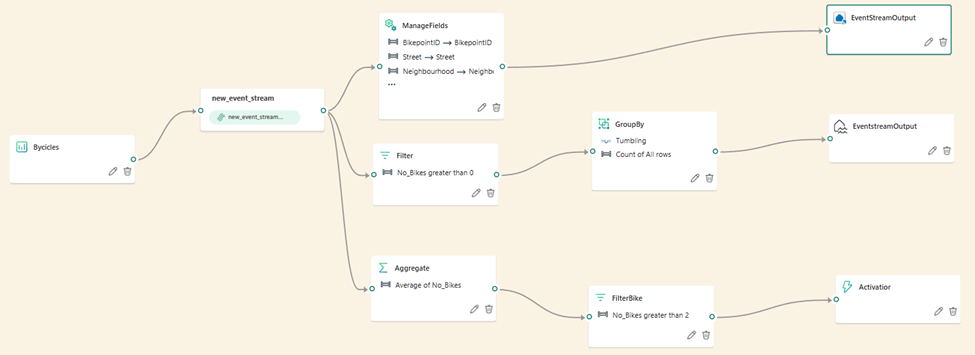
Eventstreams are responsible for:
ingestion and routing of streaming data
They connect to external producers such as application event feeds, messaging systems, and cloud-based event services.
data can be filtered, transformed, and enriched before being sent to one or more destinations.
Routing events to one or more downstream sinks
From a data engineering standpoint, Eventstreams operate on unbounded datasets, where records arrive continuously and are processed in near real time. The focus here is low latency and high throughput rather than complex analytics. Eventstreams ensure that data is shaped correctly before it reaches analytical storage, reducing downstream processing costs and complexity.
Eventhouse and KQL Databases
Once events are ingested, they are typically written to Eventhouse, which hosts KQL databases optimized for real-time analytics.
Eventhouse
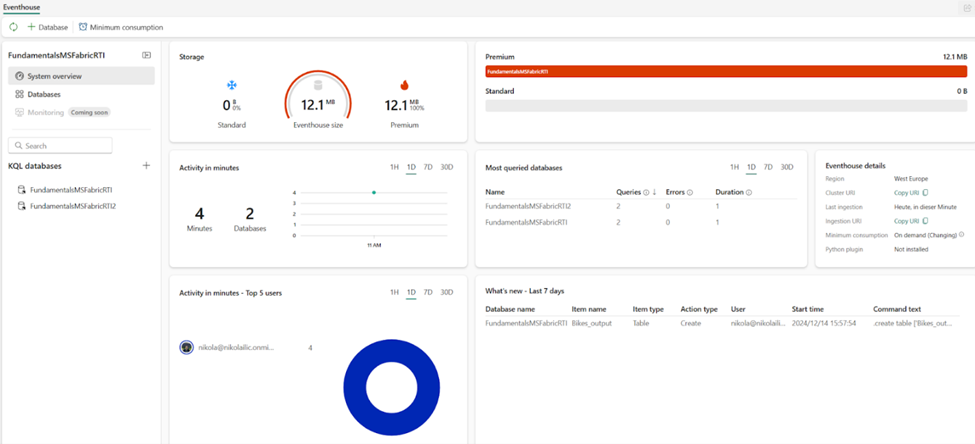
We begin by introducing the Eventhouse item. it functions primarily as a logical container for KQL databases within Fabric. It does not persist data on its own; instead, it provides the underlying infrastructure and management layer within a Fabric workspace for working with streaming and event-based data.
The figure below illustrates the System overview page of an Eventhouse, which presents a high-level view of its configuration and associated KQL databases.
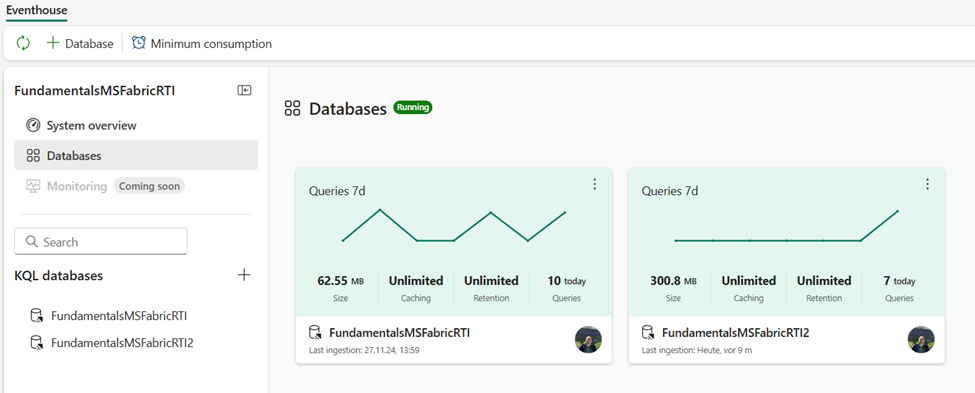
If we switch to the Databases page, we will be able to see a high-level overview of KQL databases that are part of the existing Eventhouse, as shown in below:
KQL databases are designed for:
Time-series and event-based data
Append-only ingestion patterns
Fast aggregations over recent time windows
Let’s take one step back and explain the name of the item first. While most data professionals have at least heard about SQL (which stands for Structured Query Language), we are quite confident that KQL is way more cryptic than its “structured” relative.
Let’s share some more history lessons. If you ever worked with Azure Data Explorer (ADX) in the past, you are in luck. KQL database in Microsoft Fabric is the official successor of ADX. Similar to many other Azure data services that were rebuilt and integrated into SaaS-fied nature of Fabric, ADX provided platform for storing and querying real-time analytics data for KQL databases. The engine and core capabilities of the KQL database are the same as in Azure Data Explorer – the key difference is the management behavior: Azure Data Explorer represents a PaaS (Platform-as-a-Service), whereas KQL database is a SaaS (Software-as-a-Service) solution.
Although you may store any data in the KQL database (non-structured, semi-structured, and structured), its main purpose is handling telemetry, logs, events, traces, and time series data. Under the hood, the engine leverages optimized storage formats, automatic indexing and partitioning, and advanced data statistics for efficient query planning.
Let’s now take a quick tour of the key features of the KQL database from the user-interface perspective. The figure below illustrates the main points of interest:
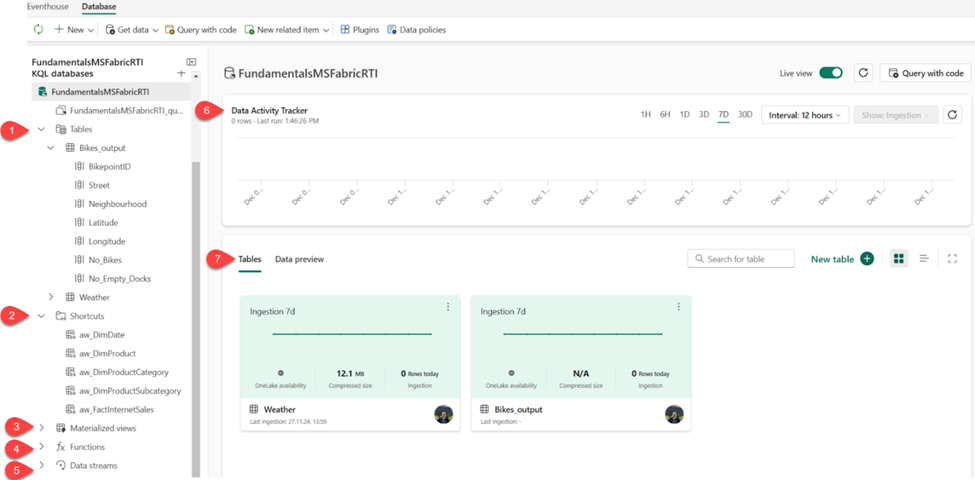
Tables displays all the tables in the database
Shortcuts shows tables created as OneLake shortcuts
Materialized views a materialized view represents the aggregation query over a source table or another materialized view. It consists of a single summarize statement
Functions these are User-defined functions stored and managed on a database level, similar to tables. These functions are created by using the .create function command
Data streams all streams that are relevant for the selected KQL database
Data Activity Tracker shows the activity in the database for the selected time period
Tables/Data preview enables switching between two different views. Tables displays the high-level overview of the database tables, whereas Data preview shows the top 100 records of the selected table
Data Activator
After data is queryable, Data Activator introduces continuous evaluation and automation into the pipeline.
From a systems perspective, Data Activator continuously evaluates query outputs or event conditions rather than static datasets. It monitors defined thresholds, patterns, or logical conditions and triggers actions when those conditions are met.
Typical actions include:
Sending notifications or alerts
Invoking workflows or automation pipelines
Integrating with external systems through triggers
This component transforms real-time analytics into event-driven operations, allowing organizations to respond to data signals as they occur, rather than reacting after the fact.
Visualization
Real-time dashboards and Power BI integration allow you to:
Plot incoming data live
Filter and drill into trends
Set alerts visually
Use natural language or Copilot to explore events

Real-Time Intelligence in Microsoft Fabric is a unified, scalable platform for real-time data analytics and automation. It brings together ingestion (Eventstreams), storage and query (Eventhouse & KQL), action (Activator), and visualization all connected through the Real-Time Hub. Whether your goal is operational monitoring, anomaly detection, or live business dashboards, Fabric gives you an end-to-end framework that avoids stitching multiple services together.
Additional Resources
Read other articles on Medium


